
SWIFT Update April 24, 2025
End-of-Year Reminders for Accounts Receivable
It is important to regularly look for and resolve accounts receivable transactions that are incomplete, have not posted, or contain errors. As we approach fiscal year-end, we must be diligent to research and resolve as many issues as possible to ensure accurate end-of-year Accounts Receivable reporting. There are a variety of features in the Accounts Receivable module to help you look for transactions that need attention.
- Check for Incomplete Deposits. Refer to the Incomplete Deposits Quick Reference Guide to help you find deposits that are not finished. This inquiry allows you to view posted and unposted deposits that require additional processing. You can monitor the payment amount for the deposit that is still in process, summarize out of balance deposits (only), and/or view a list of incomplete deposits by user.
- Check for Incomplete Payments. Refer to the Incomplete Payments Quick Reference Guide to help you find payment worksheets that are not finished and monitor payments that require additional processing. You can view a list of incomplete payments for a Business Unit or a specific user.
- Check for AR Pending Items not set to post. Refer to the Groups Not Set to Post Quick Reference Guide to help find pending items that have not posted to the customer accounts by the AR Update process. This inquiry looks for bill groups and maintenance worksheets that have not posted or have encountered errors. Both billing and maintenance groups must be posted since accounting entries have been entered in the Billing module.
- Check for “My Work” in the Accounts Receivable WorkCenter. Refer to the Accounts Receivable WorkCenter Quick Reference Guide to help you find transaction exceptions that need resolution in the My Work section of the WorkCenter. Various exceptions including posting errors, deposit balancing errors, and budget check errors.
Contact the SWIFT Help Desk for additional support.
Reminder: Purchase Order Close the Weekend of May 16
As part of the year end clean-up activities, the PO Recon (PO Close) job is scheduled to run the weekend of May 16. The PO Reconciliation Job closes purchase orders that have been fully matched by setting the Status to “Complete.” See the SWIFT Procurement Year End Processing Tips for additional information.
The PO Close job will run two additional times this year to assist in closing documents: June 30 and the hard close weekend of August 15.
Remember, you can prevent the PO Reconciliation Job from closing a purchase order by selecting the “Hold From Further Processing” checkbox on the purchase order header. You can use this checkbox if you plan on increasing the purchase order at a later date.
Review Purchase Orders for PO Close
In preparation for the year-end close, agencies can start reviewing their purchase orders now. There are several ways to cancel or close purchase orders depending on how it was created and how it was used.
Consider attending a Cancel and Close Purchase Orders webinar.
- May 15 from at 9 to 10:30 am.
- June 5 from at 9 to 10:30 am.
Here are some Quick Reference Guides to help you.
- Cancel a Purchase Order
- Close a Purchase Order in the Buyers Workbench
- Close a Purchase Order Referencing a Contract Using a Change Order
- Close Multiple Purchase Orders Using CSV Files
You can also view a summary in the Cancel and Close Purchase Orders training video.
Questions about Suppliers?
Suppliers (also known as vendors or bidders) refer to individuals or organizations that do business with the State of Minnesota. Suppliers can view events, make bids, and review payments on the Supplier Portal.
- Check out the SWIFT Vendor Resources page for information about suppliers and the Supplier Portal.
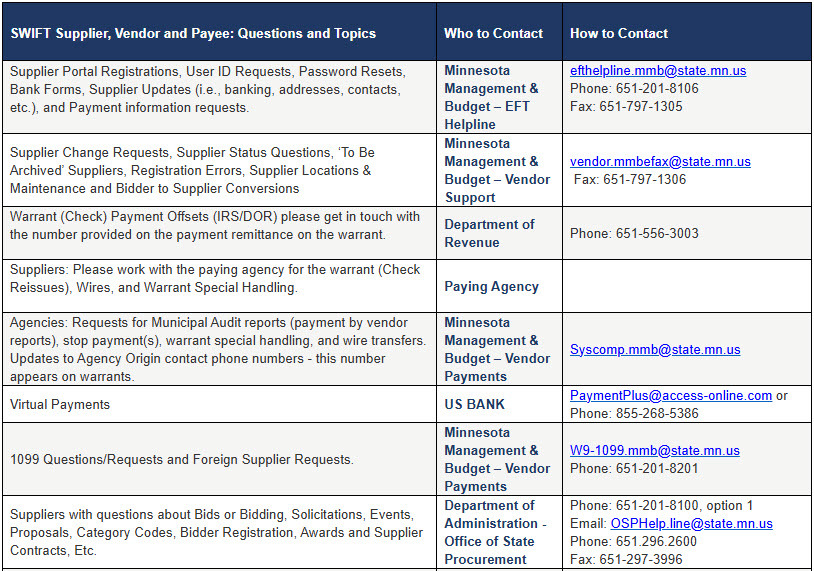
- If suppliers or bidders have any questions about the Supplier Portal, please refer them to one of the Supplier/Vendor Contacts below.
SWIFT Module Training and EPM Data Warehouse Training
The SWIFT Training team offers training through a variety of methods at no cost to the employee. There are SWIFT training guides and training videos, EPM training guides, webinars, labs, eLearning, and individual sessions (by request through the SWIFT Help Desk).
Find current SWIFT training in Learning Management. Enter "SWIFT" in the Find Learning text entry box.
|
MODULE |
WEBINARS/LABS/eLearning |
DATES |
|
INTRO |
Introduction to SWIFT Navigation webinar |
5/7/25, 6/4/25 |
|
INTRO |
Overview of SWIFT Reporting webinar |
5/15/25, 6/12/25, 7/17/25 |
|
BI |
SWIFT Billing Part 1 webinar |
6/25/25 |
|
BI |
SWIFT Billing Part 2 webinar |
6/26/25 |
|
EPM |
Build My Dashboard for SWIFT Reports lab |
6/12/25 |
|
EPM |
Create a SWIFT All Expenditures Report in EPM lab |
5/6/25 |
|
EPM |
Create a SWIFT All Receipts Report in EPM lab |
6/18/25 |
|
EPM |
Introduction to the EPM Data Warehouse for SWIFT webinar |
6/10/25 |
|
EPM |
SWIFT EPM Create and Save a New Analysis lab |
6/5/25 |
|
EPM |
SWIFT EPM Formatting Your Report lab |
5/22/25 |
|
EPM |
Use SWIFT Standard Reports in EPM lab |
6/11/25 |
|
EPM |
Understand the SWIFT Data in the EPM Data Warehouse webinar |
6/17/25 |
|
KK |
SWIFT Budget Journal Administration webinar Part 1 webinar |
5/7/25 |
|
KK |
SWIFT Budget Journal Administration webinar Part 2 webinar |
5/8/25 |
|
PO |
SWIFT Cancel and Close Purchase Orders webinar |
5/15/25, 6/5/25 |
|
PO |
SWIFT Create Purchase Orders in SWIFT webinar |
6/26/25 |
|
SS |
SWIFT Strategic Sourcing eLearning |
Anytime |
SWIFT Help Desk
Contact the SWIFT Help Desk for any SWIFT-related questions or issues.
Email: SWIFTHelpDesk.MMB@state.mn.us
Phone: 651-201-8100, option 2
Hours: 7:30 a.m. to 4:00 p.m., Monday through Friday (closed holidays)
When contacting the SWIFT Help Desk, make sure to include details about your question or issue, including:
- Your Business Unit
- Description of the issue/question
- SWIFT Module (Accounts Payable, Purchase Orders, etc.)
- Transaction ID (Voucher ID, PO ID, etc.)
- Error message print screen
Additional assistance can be found on the SWIFT Training Guides and Resources page.
SWIFT Update Newsletter
The SWIFT Update is sent to everyone on the SWIFT Update subscription list. To subscribe or unsubscribe to this newsletter, use the links below.