
SWIFT Update April 17, 2025
Opening Excel Files from SWIFT with Windows 11
SWIFT users with a Windows 11 operating system on their state computer may have trouble when trying to open a downloaded Excel file from SWIFT. Until a permanent solution is found, you can avoid the issue by renaming the file extension on the downloaded file from “.xls” to “.html” and then open the file directly from the Excel application.
For detailed instructions on how to rename the file extension, refer to the Open Excel Files from SWIFT with Windows 11 Quick Reference Guide. Please direct other questions and issues to the SWIFT Help Desk.
Reminder: Avoid Process Issues in the Billing and Accounts Receivable Modules
Manually running multiple processes in SWIFT can create Process Instance issues. Commonly run manual processes include Single Action Invoice (SAIP) and ARUpdate.
To avoid issues, we ask users to do the following:
- Users manually run SAIP. SAIP is a large job that combines many processes across several modules in SWIFT. There are occasions when users must rerun an invoice through SAIP, for example, after a correcting a budget check error. Before you run an invoice through SAIP a 2nd or 3rd time, we ask that you research the invoice thoroughly to ensure that rerunning SAIP is necessary. Refer to the View Bill Summary Information Quick Reference Guide for more information.
- ARUpdate is automatically scheduled to run in a batches five times throughout each business day. We ask that users with permissions to run ARUpdate manually refrain from doing so unless necessary. Please allow your Accounts Receivable transactions to be picked up in the automated batch process.
- Users should avoid canceling or deleting their process requests. Canceling or deleting a process instance can cause ARUpdate to fail processing manual and automatic batch runs.
We appreciate your cooperation and apologize for any inconvenience. If you have questions or experience issues, please contact the SWIFT Help Desk by email or phone at 651-201-8100, option 2.
Add Comments to Purchase Orders
You can add comments and attachments to a purchase order by following these steps.
1. On the purchase order header, select the Add Comments link.
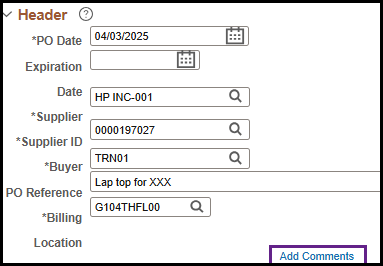
2. SWIFT opens the PO Header Comments page.
- Add text to the Comments box.
- As an option, you can select the Send to Supplier box if you want the comment to appear on the purchase order and be sent to the supplier.
- You can also select the Show at Voucher if you want the comment to appear on the voucher.
- And, you can select Show at Receipt if you want the comment to appear on the receipt.
- You may also press the Attach button to attach any documents as needed.
- Press OK when you are done.

SWIFT Finance Specialist Team Lead Position
Minnesota Management and Budget is hiring a Financial Specialist Team Lead (Finance Specialist 2 or 3) position.
The position is responsible for providing advice and functional assistance to state agencies regarding the use of the SWIFT, consulting with agencies on improving financial management, accounting procedures and business processes, and assisting in the design of modifications to SWIFT to better fit agency business needs. This position works closely with the MN.IT MMB technical developers, batch operations staff, and security staff in resolving system related issues and participating in system upgrades. The position will serve as the team leader by coordinating tasks and providing guidance and expertise to the SWIFT Module Support Team for the Accounts Payable, Billing/Accounts Receivable, and Grants/Projects Modules, including helping to resolve the more complex system issues.
This posting will hire at the Finance Specialist 3 or Finance Specialist 2 level, depending on qualification of applicant. Working for the State of Minnesota means a great work-life balance, affordable benefits, and many great opportunities for advancement in 100 State agencies.
SWIFT Module Training and EPM Data Warehouse Training
The SWIFT Training team offers training through a variety of methods at no cost to the employee. There are SWIFT training guides and training videos, EPM training guides, webinars, labs, eLearning, and individual sessions (by request through the SWIFT Help Desk).
Find current SWIFT training in Learning Management. Enter "SWIFT" in the Find Learning text entry box.
|
MODULE |
WEBINARS/LABS/eLearning |
DATES |
|
INTRO |
Introduction to SWIFT Navigation webinar |
5/7/25, 6/4/25 |
|
INTRO |
Overview of SWIFT Reporting webinar |
5/15/25, 6/12/25, 7/17/25 |
|
BI |
SWIFT Billing Part 1 webinar |
6/25/25 |
|
BI |
SWIFT Billing Part 2 webinar |
6/26/25 |
|
EPM |
Build My Dashboard for SWIFT Reports lab |
6/12/25 |
|
EPM |
Create a SWIFT All Expenditures Report in EPM lab |
5/6/25 |
|
EPM |
Create a SWIFT All Receipts Report in EPM lab |
6/18/25 |
|
EPM |
Introduction to the EPM Data Warehouse for SWIFT webinar |
6/10/25 |
|
EPM |
SWIFT EPM Create and Save a New Analysis lab |
6/5/25 |
|
EPM |
SWIFT EPM Formatting Your Report lab |
5/22/25 |
|
EPM |
Use SWIFT Standard Reports in EPM lab |
6/11/25 |
|
EPM |
Understand the SWIFT Data in the EPM Data Warehouse webinar |
6/17/25 |
|
KK |
SWIFT Budget Journal Administration webinar Part 1 webinar |
5/7/25 |
|
KK |
SWIFT Budget Journal Administration webinar Part 2 webinar |
5/8/25 |
|
PO |
SWIFT Cancel and Close Purchase Orders webinar |
5/15/25, 6/5/25 |
|
PO |
SWIFT Create Purchase Orders in SWIFT webinar |
6/26/25 |
|
SS |
SWIFT Strategic Sourcing eLearning |
Anytime |
SWIFT Help Desk
Contact the SWIFT Help Desk for any SWIFT-related questions or issues.
Email: SWIFTHelpDesk.MMB@state.mn.us
Phone: 651-201-8100, option 2
Hours: 7:30 a.m. to 4:00 p.m., Monday through Friday (closed holidays)
When contacting the SWIFT Help Desk, make sure to include details about your question or issue, including:
- Your Business Unit
- Description of the issue/question
- SWIFT Module (Accounts Payable, Purchase Orders, etc.)
- Transaction ID (Voucher ID, PO ID, etc.)
- Error message print screen
Additional assistance can be found on the SWIFT Training Guides and Resources page.
SWIFT Update Newsletter
The SWIFT Update is sent to everyone on the SWIFT Update subscription list. To subscribe or unsubscribe to this newsletter, use the links below.