
SWIFT Update July 10, 2025
Annual Budget and Accounting Instructions - Document 3
The Annual Budget and Accounting Instructions - Document 3 is now posted on the SWIFT Budget and Accounting Instructions page. The current year document is posted under Establishing Budget Fiscal Years 2026-27 Budgets and Closing Fiscal Year 2025.
Requirement to Resolve OLT Rows in Grants Module by Hard Close
Agencies must clear up over limit (OLT) rows in the Grants module prior to hard close. Over limit rows represent transactions processed against a grant agreement which have exceeded the established contract Billing Limit. OLT rows will cause complications with SEFA reporting and may require your agency to make manual adjustments to the report if not resolved by hard close.
Run the query, "M_GM_GBL_GRNT_OVER_LIMIT_TRANS" from the Query Viewer in SWIFT to obtain a list of over limit transactions for your agency.
To resolve OLT rows:
- Agencies can process a contract amendment to increase the contract Billing Limit. Refer to the Add or Reduce Grant Funding Quick Reference Guide for instructions. After completing the contract amendment, the OLT rows should disappear following overnight batch processing.
- If total grant expenditures exceed the reimbursable amount of the grant, agencies should process expenditure corrections to move expenditures.
If you have questions or issues regarding resolving OLT rows, please contact the SWIFT Help Desk.
Requirement to Resolve Possible Missing Expenditures in Grants Module
Sometimes agencies add a project and/or activity that relate to an existing contract but fail to associate the project/activity to the contract. When this happens, the expenditures are excluded from SEFA reporting. Run the query, “M_GM_GBL_UNBILLED_REIMB_ROWS” from the Query Viewer in SWIFT to obtain a list of 2025 reimbursable transactions without contract numbers.
Refer to the Add Projects and Activities Quick Reference Guide for more information. After completing, please email MMB at AgencyAssistance.MMB@state.mn.us to run the Pricing job to create the billable rows. Once the billable rows are created, the expenditures will properly reflect on SEFA reporting.
If you have questions or issues regarding resolving possible missing expenditures, please contact the SWIFT Help Desk.
Respond to Problem Reports
Encumbrance Certification
- Agencies must cancel all encumbrances for the fiscal year unless the agency head certifies that goods were purchased or services were rendered by June 30, 2025 (MS 16A.28).
- Agencies must certify encumbrances by completing and returning the certification report to Minnesota Management and Budget (MMB).
Appropriation Problem Reports
- MMB will continue to send problem reports out every Monday.
- These reports identify appropriations that are over-obligated, over-extended, or have open requisitions (pre-encumbrances) or anticipated transfers.
- Agencies must resolve these conditions by August 8, 2025, in preparation for hard close on August 15, 2025.
Reminder: If payroll costs need to be moved to resolve any of these issues, the deadline for payroll mass expense transfers is noon on July 25, 2025.
Federal Indirect Cost Payments
Agencies need to process their federal receipt vouchers for the indirect costs timely as well to be included in the reverse bilateral netting process. Please see Budget and Accounting Instructions - Document 2 for details on how to enter Federal Indirect Cost Vouchers. You can find it on the SWIFT Budget and Accounting Instructions page.
The reverse bilateral netting process will run on the following dates:
- July 18, 2025
- August 1, 2025
- August 13, 2025
How to Process Transactions During the Close Period
The close period is July 1 through August 15, 2025. When entering transactions in the close period, do not let the Accounting Date default to the current date.
A. Transfers
Agency staff should always use the current date in the Journal Date field when entering budget transfers in SWIFT. The current date populates into the Journal Date field by default. BFY 2025 transfers processed after June 30 must reference the current date/date processed in the Journal Date field and should not be backdated.
B. Receipts
- For SWIFT receipts that were deposited at the bank by June 30 but the deposit entry in SWIFT was not recorded by June 30, use an Accounting Date of June 30, 2025 and a Received Date of when you deposited the receipt at the bank.
- In the rare exception that a miscellaneous cash receipt (SWIFT directly journalled deposit) is received July 1, 2025 or later and relate to FY 2025, agencies should use an Accounting Date of June 30, 2025 and a Received Date of the date the receipt was deposited at the bank.
- Make sure that all miscellaneous cash receipt transactions (SWIFT directly journalled deposits) coded to Budget Fiscal Year (BFY) 2025 have a matching accounting Fiscal Year (FY) of 2025. Use an Accounting Date of June 30, 2025 or a prior date.
- Process directly journalled deposit corrections for FY 2025 with an Accounting Date of June 30. These must be processed no later than August 15, 2025.
C. Payments
For payments, the Accounting Date is based on the Received Date of the goods or services. This Received Date may cause the Budget Date to be different. The goods or services must be received by June 30 to be in accounting FY 2025.
D. Indirect Cost Payments
If you make indirect cost payments after June 30 that relate to FY 2025, enter the Accounting Date of June 30, 2025. Change this field manually; do not let this date default as SWIFT will default it to the current date.
E. Capital Assets
The SWIFT Asset Management (AM) module will close for FY 2025 activity at the hard close this year on August 15. Agencies should complete all FY 2025 AM transactions on or before that date. FY 2025 transactions entered between July 1 and August 15 must have an Accounting Date of June 30 or prior if they are to be recorded as FY 2025 transactions.
ACFR Asset Certification reports will be available in the EPM Data Warehouse to aid in completing the Asset Certifications. The Capital Asset Certification worksheets and instructions will be emailed for agencies to complete on August 1 and due back August 21, 2025. Send capital asset certification questions to Emily.Guest@state.mn.us.
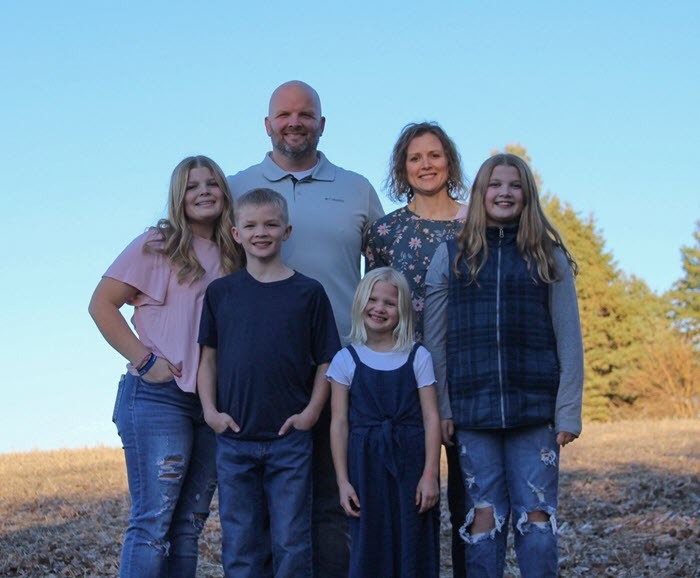
SWIFT Staff Spotlight: Beau Blake
Get to know the SWIFT Help Desk members who answer your calls, respond to your emails, and make sure you get the information you need. This spotlight is on, Beau Blake, our newest member on the SWIFT Help Desk and Training team at Minnesota Management and Budget (MMB).
How long have you the State of Minnesota? I joined the SWIFT Help Desk on June 18, 2025. I’ve been with the State of MN for almost 9 years. I worked in highway maintenance with MNDOT for 7 years and I spent the last 2 years as a Vocation Rehab Tech with DEED. I supported 3 Career Counselors in all areas of case management. My favorite part about that job was interacting with participants and helping them achieve their career goals through the purchasing of various products and services.
What's your favorite part of your job?
Learning how to troubleshoot and resolve common issues with SWIFT has been challenging but enjoyable at the same time.
Fun Fact: I live in the country by Stewartville, MN but am originally from Austin, MN. I have 4 kids and have been married to my wife Jenny for 16 years. My favorite movie of all time is Top Gun. I’m a die hard 1990’s Country Music fan with a soft spot in my heart for Metallica. I love spending time with my family but am quick to ignore them (with no remorse) if a Pro Motocross or Supercross race is on the TV.
Payroll Budget Fiscal Year (BFY) 2025 Deadlines
- Relocation Expense Reports and Expense Transfers must be received at Statewide Payroll Services by noon on July 14.
- Employee Travel Advances must be settled no later than pay period ending July 15. The deadline for entering these travel advance settlements is the end of the day on July 17.
- Mass Expense Transfers are due in pay period ending July 15. These transfers can be entered in SEMA4 until noon on July 25.
- Agency Default Accounts updates are due no later than pay period ending July 15. Transfers can be entered on the Mass Expense Transfer page until noon on July 25.
- Prior Period Adjustments need to be entered by pay period ending July 15. Adjustments can be entered until noon on July 18.
- Employee Business Expense Reports and Business Expense Transfers are due end of day July 17.
SWIFT Module Training and EPM Data Warehouse Training
The SWIFT Training team offers training through a variety of methods at no cost to the employee. There are SWIFT training guides and training videos, EPM training guides, webinars, labs, eLearning, and individual sessions (by request through the SWIFT Help Desk).
Find current SWIFT training in Learning Management. Enter "SWIFT" in the Find Learning text entry box.
|
MODULE |
WEBINARS/LABS/eLearning |
DATES |
|
INTRO |
Introduction to SWIFT Navigation webinar |
8/20/25, 9/18/25 |
|
INTRO |
Overview of SWIFT Reporting webinar |
7/17/25, 8/15/25, 9/18/25 |
|
AP |
SWIFT Create Vouchers Overview in Accounts Payable Webinar |
10/16/25 |
|
BI |
SWIFT Billing Part 1 webinar |
8/27/25 |
|
BI |
SWIFT Billing Part 2 webinar |
8/28/25 |
|
EPM |
Build My Dashboard for SWIFT Reports lab |
9/11/25 |
|
EPM |
Create a SWIFT All Expenditures Report in EPM Lab |
10/1/25 |
|
EPM |
Create a SWIFT All Receipts Report in EPM lab |
9/25/25 |
|
EPM |
Introduction to the EPM Data Warehouse for SWIFT webinar |
8/19/25 |
|
EPM |
SWIFT EPM Create and Save a New Analysis lab |
8/21/25 |
|
EPM |
SWIFT EPM Create and Save the Manager's Financial Report lab |
8/7/25 |
|
EPM |
SWIFT EPM Formatting Your Report lab |
9/24/25 |
|
EPM |
Use SWIFT Standard Reports in EPM lab |
9/10/25 |
|
EPM |
Understand the SWIFT Data in the EPM Data Warehouse webinar |
9/9/25 |
|
EPRO |
SWIFT Create a Catalog Punchout Requisition webinar |
7/17/25 |
|
PO |
SWIFT Create Purchase Orders in SWIFT webinar |
9/25/25 |
|
SS |
SWIFT Strategic Sourcing eLearning |
Anytime |
SWIFT Help Desk
Contact the SWIFT Help Desk for any SWIFT-related questions or issues.
Email: SWIFTHelpDesk.MMB@state.mn.us
Phone: 651-201-8100, option 2
Hours: 7:30 a.m. to 4:00 p.m., Monday through Friday (closed holidays)
When contacting the SWIFT Help Desk, make sure to include details about your question or issue, including:
- Your Business Unit
- Description of the issue/question
- SWIFT Module (Accounts Payable, Purchase Orders, etc.)
- Transaction ID (Voucher ID, PO ID, etc.)
- Error message print screen
Additional assistance can be found on the SWIFT Training Guides and Resources page.