Learn how Minnesota's new accessible eLearning template helps designers build more inclusive online training
10/28/2026 10:53:22 AM
Content author: Tyler Osterhaus, eDeveloper & Instructional Designer, Minnesota Department of Children, Youth, and Families (DCYF)
National Disability in Employment Month (NDEAM), celebrated each October, highlights the contributions of workers with disabilities and the importance of inclusive workplaces. The 2026 theme, Celebrating Value and Talent, illustrates the importance of ensuring all employees have opportunities to develop their skills, grow professionally, and contribute their expertise.
One way organizations can support that goal is by creating training programs that give everyone equitable access. When organizations remove barriers to learning, employees can engage more fully in professional development opportunities regardless of how they access information.
To help make accessible eLearning easier to create, the State of Minnesota eLearning Community of Practice developed an accessible template for Articulate Storyline 360 for executive branch agencies. The template helps course designers build accessibility into online learning from the beginning while reducing development time and increasing consistency across projects.
Learn how the eLearning Community of Practice developed this template, the accessibility features it supports, and how your organization can apply similar principles to create more inclusive learning experiences.
The eLearning Community of Practice (CoP) brings staff together from Minnesota executive branch agencies to share expertise, exchange ideas, and strengthen online learning. Members include eDevelopers, instructional designers, subject matter experts, multimedia content producers, and others.
Through monthly meetings, members discuss eLearning development, share projects and resources, and support one another. Accessibility is a recurring focus, particularly in courses that rely heavily on multimedia.
The CoP identified the need for an accessible eLearning template available across the executive branch. Over the past year, the CoP created a work group to develop an accessible eLearning template that simplifies some of the accessibility work involved in course development. The template helps designers create more accessible courses, reduces production time, and helps new designers consider accessibility from the beginning of the design process.
Many tools are available for creating online courses. The workgroup began by developing a template for Articulate Storyline 360 because state agencies use it more widely than other platforms. The CoP hopes to develop templates for other platforms in the future.
The work group met twice in fall 2025 for day-long retreats at the Minnesota Department of Transportation’s training center in Shoreview, Minnesota.
During the first retreat, members identified the design elements the template would need to address and discussed how it could help developers meet Web Content Accessibility Guidelines (WCAG) 2.1 standards.
Accessible design does more than simply meet requirements; it gives learners options that support how they work best.
During the second retreat, members created a draft outline for the template and refined its design scope. The goal was to create a flexible template designers could use and customize with different levels of experience for specific program areas and design needs.
The template serves as a practical starting point for designers who understand accessibility requirements but need help translating them into working Storyline features. The work group already built much of the underlying programming into the template, including controls that allow learners to customize their experience.
For example, learners can choose settings such as:
The template also demonstrates how Storyline variables, triggers, layers, and states help create accessible interactions designers can adapt for their own projects. This screenshot shows the triggers and slide layers in a Storyline template:
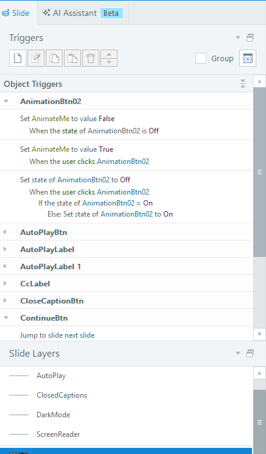
Image caption: A screenshot of a Storyline template showing a list of triggers and slide layers, including object triggers for buttons and their associated actions.
The template includes a prompt asking learners whether they use a screen reader. State of Minnesota enterprise applications, including MMB’s Enterprise Learning Management (LM) system, commonly use this approach. The screenshot shows how learners access these features as they begin a course:
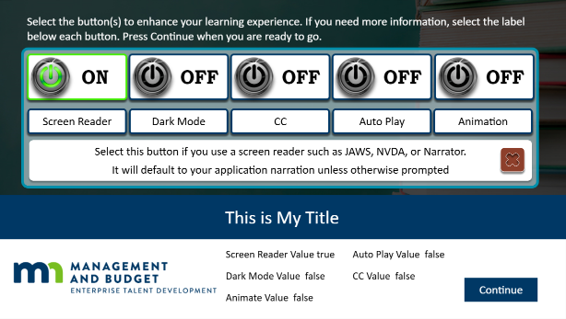
Designers can customize the template’s language and learning experience to best meet their audience’s needs.
It provides a starting point for applying accessibility best practices and helps developers learn techniques they can use in future projects.
The eLearning CoP will host a virtual workshop to teach state employees how to use the template and apply its accessibility principles. Participants will receive project files to build along with the instructors. And instructors will be there to support participants as they work through any design issues they encounter.
During the workshop, instructors will:
The workshop will be offered twice. Participants can choose the session that works best for their schedule.
State of Minnesota employees can register using the Accessible Storyline Template Workshop Registration Form. Individuals outside state government interested in attending can contact MNIT's Office of Accessibility to inquire about availability.
Following the initial workshops, the team plans to develop an on-demand tutorial that incorporates participant feedback and lessons learned from the live sessions.
Organizations interested in creating accessible online learning do not need to start from scratch. Begin by identifying accessibility requirements early in the design process and selecting tools that support inclusive learning experiences. Consider how learners with different abilities, preferences, and technologies will interact with your content. Building accessibility into a project from the beginning is more effective and efficient than trying to add it after development is complete.
Accessible eLearning recognizes that people learn in different ways and may use different technologies to access information. Investing in employee development helps people build skills, advance their careers, and contribute their talents more effectively. Accessible training helps employees fully participate in learning opportunities and professional growth.
As we recognize National Disability Employment Awareness Month, this work helps ensure employees with disabilities can access the learning opportunities they need to contribute their skills, grow their careers, and thrive in Minnesota’s workforce.
Accessibility
Accessibility

