Overview
The success criterion states that the visual presentation of the following have a contrast ratio of at least 3:1 against adjacent color(s):
- User Interface Components: Visual information required to identify user interface components and states, except for inactive components or where the appearance of the component is determined by the user agent and not modified by the author.
- Graphical Objects: Parts of graphics required to understand the content, except when a particular presentation of graphics is essential to the information being conveyed.
Key messages and examples
- This success criterion ensures that important visual information (such as icons, charts, graphs, and diagrams contained in a document or presentation) meets the same minimum contrast required for larger text, achieving a 3:1 contrast ratio with the background.
- According to the W3 understanding non-text contrast webpage, if a graphic is needed to understand the content or functionality of a document or social media post, then it should be perceivable by people with low vision or other impairments without the need for contrast-enhancing assistive technology.
However, that is not a requirement when:
- A graphic with text embedded or overlayed conveys the same information, such as labels and values on a chart. Note: Text within a graphic must meet still meet SC 1.4.3 Contrast (Minimum).
- The graphic is for aesthetic purposes that does not require the user to see or understand it to understand the content or use the functionality.
- The information is available in another form, such as in a table that follows the graph, which becomes visible when a "Long Description" button is pressed.
- The graphic is part of a logo or brand name (which is considered "essential" to its presentation).
W3 describes the term "graphical object" as applying to stand-alone icons such as a print icon (with no text), and the important parts of a more complex diagram, such as each line in a graph. For simple graphics, such as single-color icons, the entire image is a graphical object. Images made up of multiple lines, colors and shapes will be made of multiple graphical objects, some of which are required for understanding. Not every graphical object needs to contrast with its surroundings - only those that are required for a user to understand what the graphic is conveying.
Examples of graphics to which the success criterion applies
Icons, graphs, diagrams, and infographics are examples of graphic objects that are composed of lines or shapes and a limited color palette over which the content author has creative control. Content authors should ensure that these graphics conveying important information have a 3:1 contrast ratio against the background.
Exceptions
Examples of images to which the success criterion does not apply
There are exceptions to this rule in cases where changing the color changes the meaning. For example, changing the colors in flags, photography, and heatmaps would change the meaning, so they are exempt.
Though the success criterion does not apply to photography, alternative text should always be applied to photos for the benefit of assistive technology users.
Digital paintings and decorative illustrations, like photography, do not fall under the success criterion, but should also receive alternative text.
How to implement
Examples of low and high contrast graphics
Example 1: Icon

The first example of this “add user” icon uses Minnesota green (#78be21) against white, which has a contrast ratio of 2.3:1. This results in a failure rating in Colour Contrast Analyser. The icon using accent teal (#008eaa) against white has a contrast ratio of 3.9:1 against white, which passes.
Example 2: State of Minnesota icon

Here is a white State of Minnesota icon with a dark “accent green” border (#0D5257) on a “Minnesota green” circle background (#78BE21). The state shape has sufficient contrast against the green circle (a ratio of 3.9:1), while the green circle has low contrast (a ratio of 2.3:1) against the white background. The state outline conveys all the important information in the icon, while the circle conveys no meaningful information. Therefore, it is an example of acceptable color use in an icon.
The second icon in the example, however, has white State of Minnesota shape with a dark green border against a “Minnesota green” heart. In this case, the heart conveys meaningful information – it conveys a meaning of “Minnesota love” to a user with perfect vision, while to a low vision user who cannot perceive the edges of the heart shape, it merely conveys the meaning “Minnesota.” In this case, a different design approach should be used.
Example 3: State of Minnesota with border outline

The icons above use alternative design approaches to achieve greater contrast than the previous examples. In the first two, a “Minnesota blue” border (#003865) added to the outside of the heart makes that shape discernable. One example shows a lightened version of “Minnesota green” to improve contrast further. In the third example, a combination of Minnesota blue (#003865) with accent teal (#008EAA) achieves high contrast against a white background for both the heart and State of Minnesota shapes.
Low and high contrast diagram examples:
Example 4: Process flow diagram
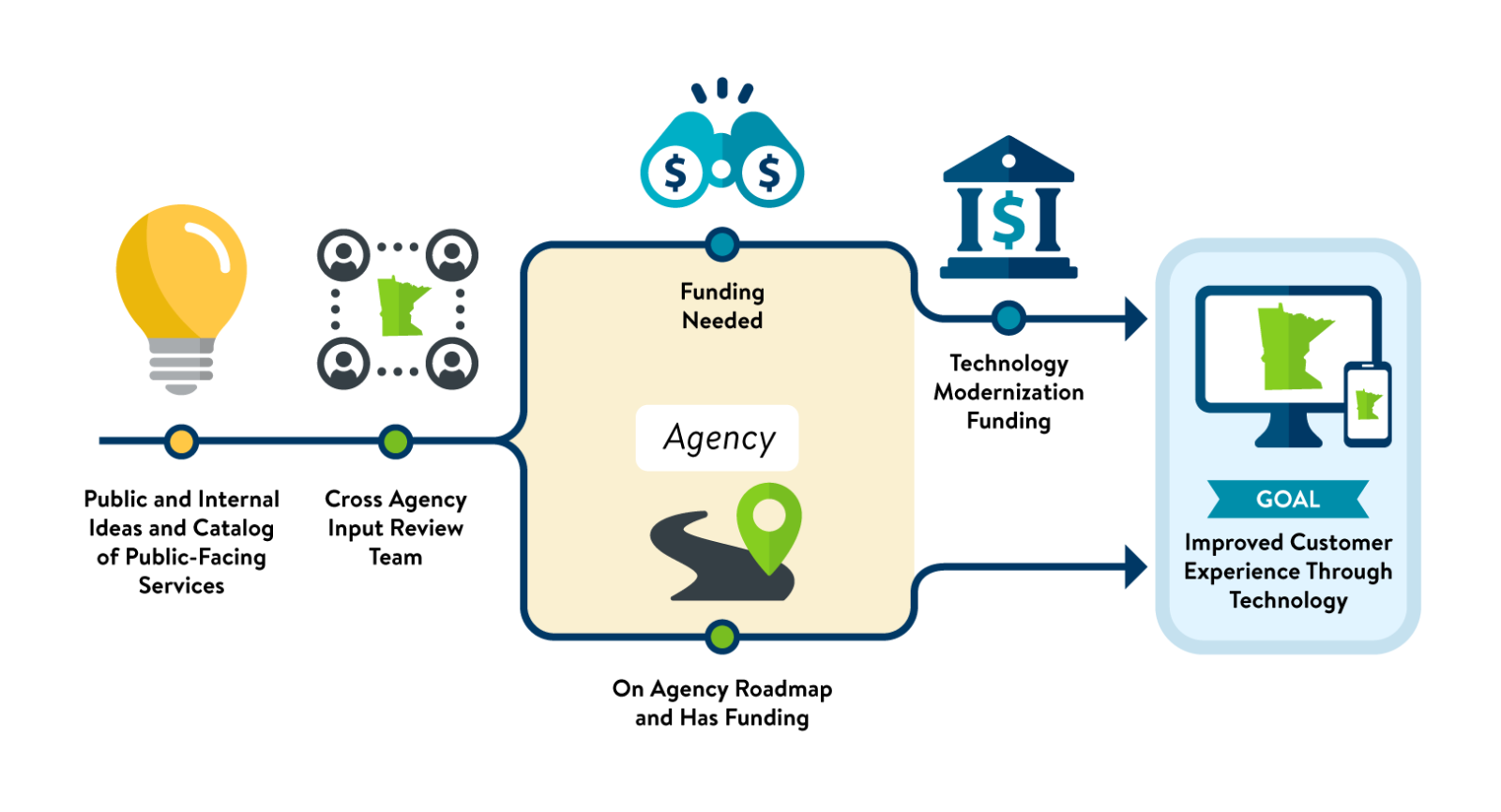
Example of a process flow diagram with a few low contrast elements, notably the yellow light bulb, green state outlines, and map pin. Most of the other visual elements have sufficient contrast against the white background, and the text labels are high contrast as well.
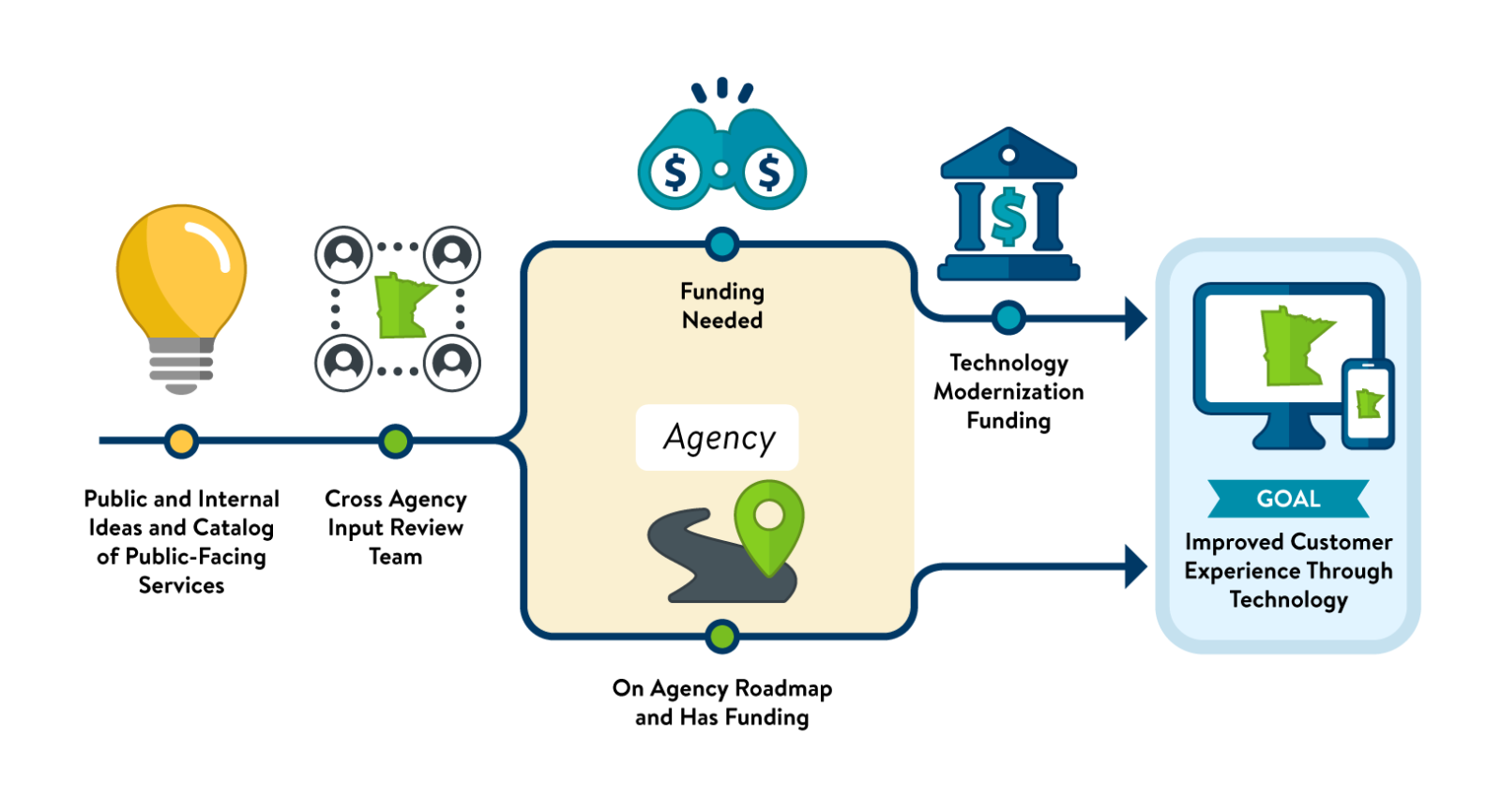
By changing the style of the icons slightly, the added outer border (also called a “stroke” in graphic design terminology) can be darkened to achieve greater contrast against the white background without greatly affecting the original appearance of the icons. To keep all the icons visually consistent, the same design approach was used even for icons that were previously high contrast against white. In addition to having higher contrast, the redesigned icons have a bit more dimension and visual interest as well.
Choosing the right State of Minnesota brand colors for graphic elements
The State of Minnesota Brand style guide provides color values for all brand colors, which are divided into “primary brand colors” (Minnesota Blue and Minnesota Green) and “accent colors” that can be used in charts, graphs, icons and other data visualizations.
We have a defined “high contrast” color palette which, in addition to Minnesota Blue (#003865), provides high contrast color options against white backgrounds. These colors are integrated into the color palette in our State of Minnesota enterprise document templates to make it easy for content authors to use them.
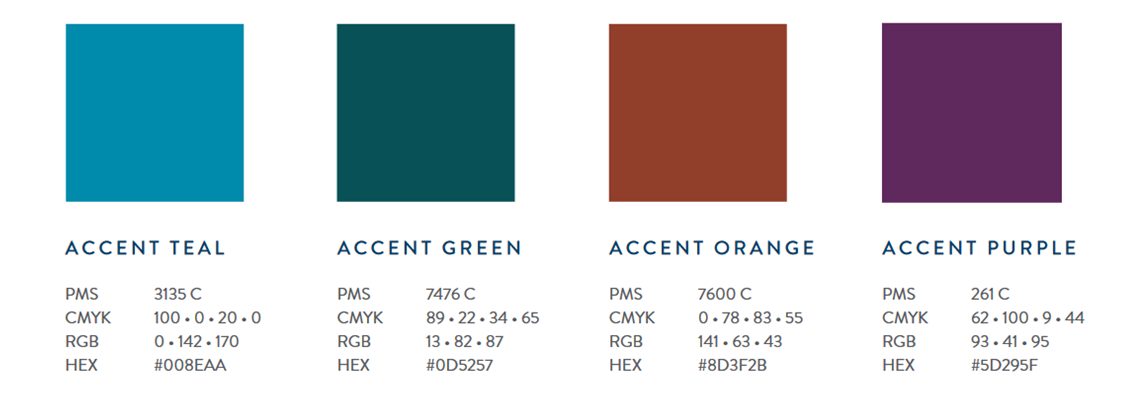
High contrast accent color palette with color values for Accent Teal, Accent Green, Accent Orange and Accent Purple in PMS, CMYK, RGB and HEX color modes.
It’s important to understand that no color is inherently accessible – even though the high contrast color palette provides viable color options against a white background, any of them could fail if placed against a darker colored background. For this reason, content authors should learn to rely on color contrast testing tools, such as Colour Contrast Analyser, to check their work, rather than make assumptions about the “accessibility” of a color.
When using Minnesota brand colors, be careful to not use “Minnesota green” (#78BE21) against a white background for text or graphic elements. Though Minnesota green does provide high contrast against certain dark background colors (including Minnesota blue), it does not pass against a white background when used for text or graphics. Minnesota brand colors with higher contrast should be appropriately employed instead, and the Minnesota State Brand style guide provides examples of high contrast color combinations and appropriate use. The green usage in State of Minnesota logos is acceptable because WCAG provides an exemption for color contrast for logos, per Success Criterion 1.4.3 (Minimum text contrast).
Achieving sufficient contrast between adjacent colors
When designing charts, graphs, or other graphic objects, W3 provides design techniques for providing sufficient contrast at the boundaries between adjoining colors. Below are several graph examples demonstrating different color choices. Versions are shown with problematic color contrast, along with a design solution that fixes the issue. Different graph labeling techniques are also shown to ensure usability for low-vision and colorblind users.
Graph example 1: Dark colors and problematic legend
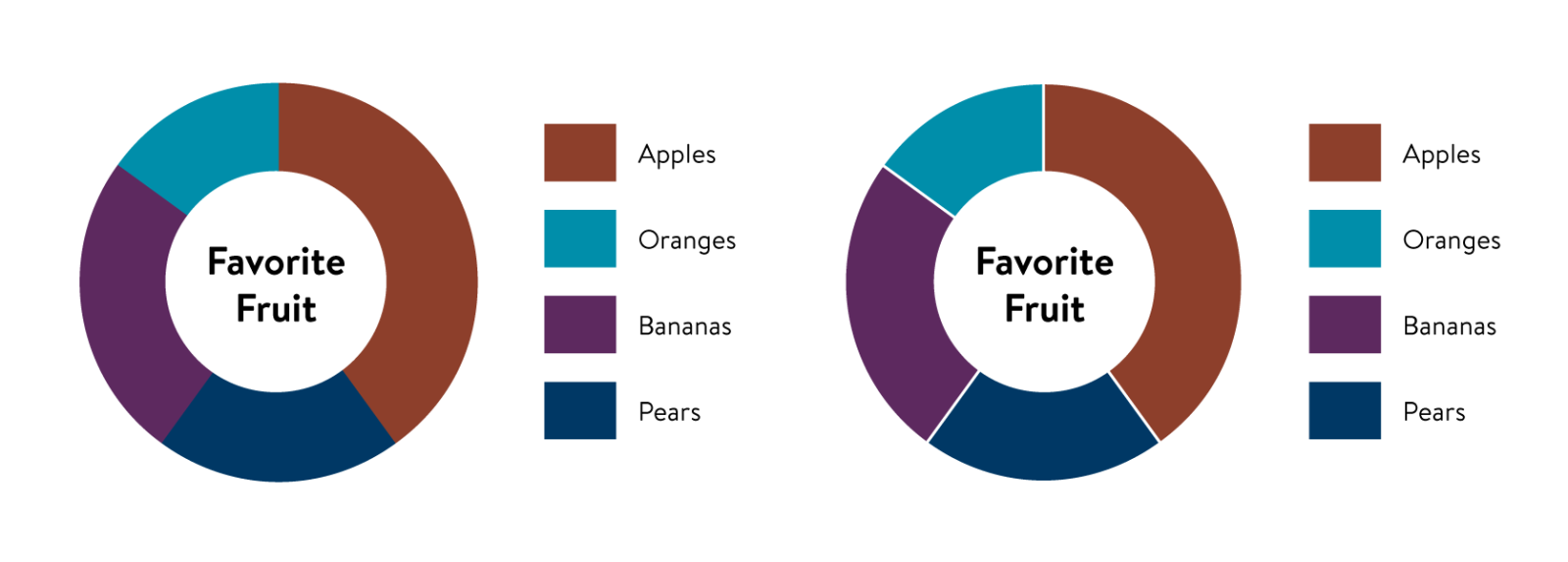
The first graph in example 1 features dark color segments that have high contrast against a white background. It also has a legend with different color values representing various types of fruit. Even though the colors have sufficient contrast against white, they do not have enough contrast against each other.
The second graph in this example shows the addition of white outlines to the graph segments, which provides necessary contrast against the background and each other. Even though the segments are now discernable from each other, the design decision to use a legend could lead to problems for some users, since the graph still relies on color to provide meaning, and the user will need to identify the colors in the legend with each respective segment. One solution is to use a pattern fill.
Graph example 2: Dark colors, legend, and pattern fills
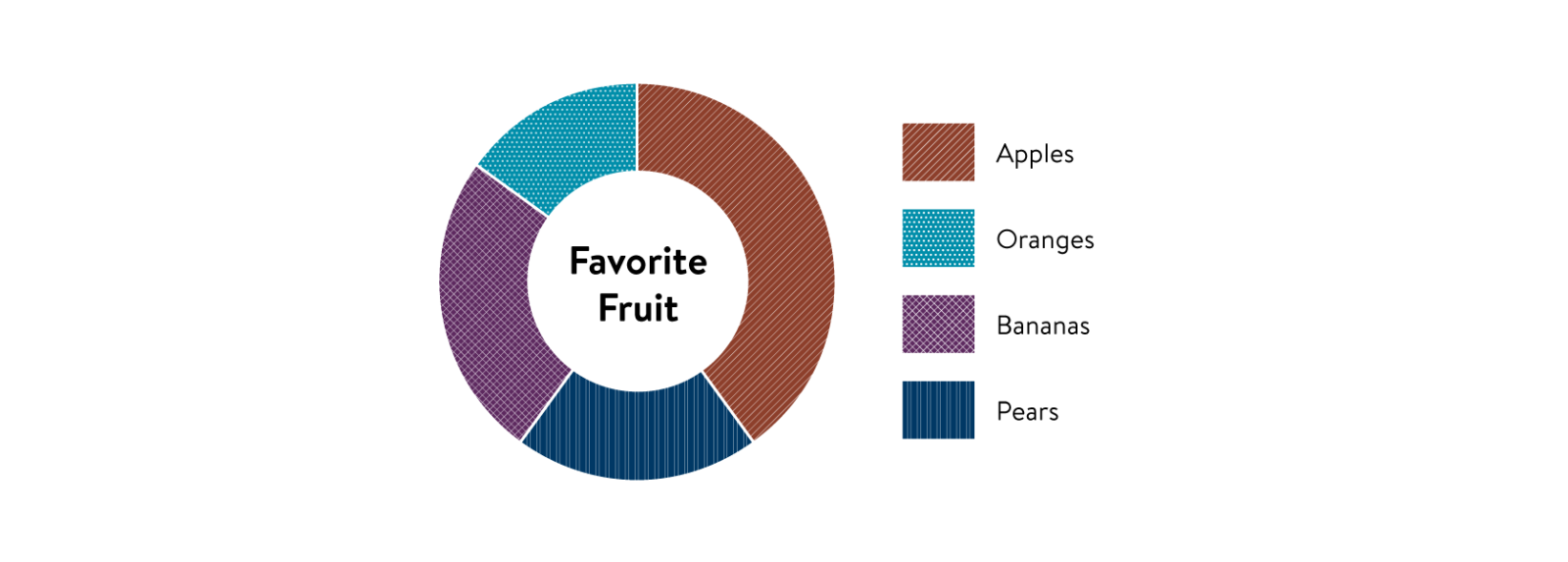
In graph example 2, pattern fills have been added to the graph and legend, which now include color and texture as a means for identifying each segment. Adding pattern fills is critical if you need to use a map legend. Alternative methods for labeling graphs are recommended.
Graph example 3: Light colors
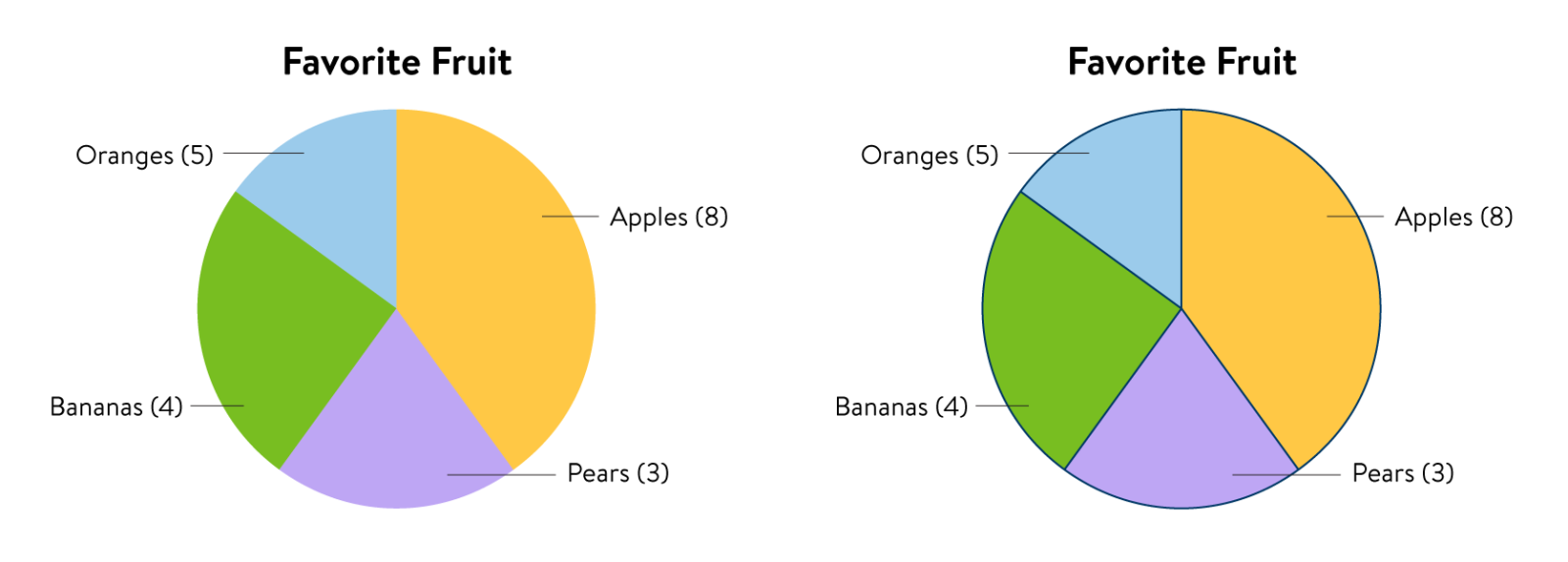
In graph example 3, the first pie chart in this example features light color segments that are low contrast against a white background. By adding a dark “Minnesota blue” outline with a hex value #003865 around the segments, each is discernable from the white background.
Graph example 4: Light and dark colors, with labels and values inside graph
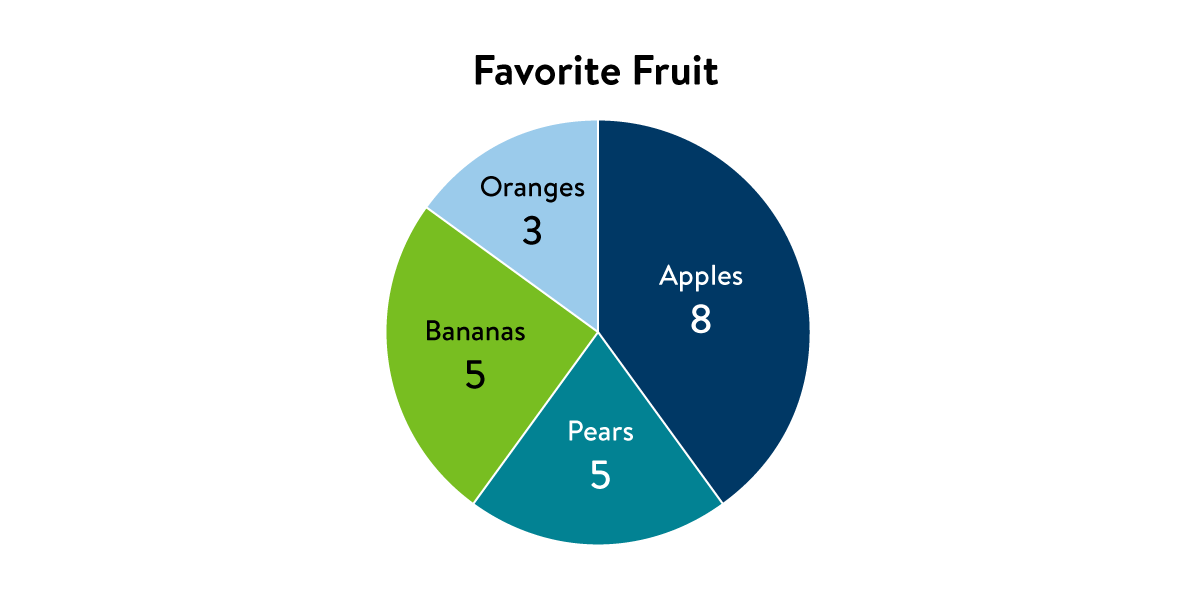
Graph example 4 features segments that are a mix of light and dark colors against a white background. Each is separated by a white outline. “Minnesota green” and “accent sky blue” are low contrast against white, while “Minnesota blue” and a darkened value of “accent teal” (#028293) are high contrast against white. Each segment has high contrast text labels against the background fill color, providing a minimum contrast ratio of 4.5:1 for small text. Because both identifying labels and values are provided in each segment, this graph is compliant as-is under WCAG 2.1 and meets criterion 1.4.3 Contrast (Minimum).
Graph example 5: Light and dark colors with addition of white and black outlines
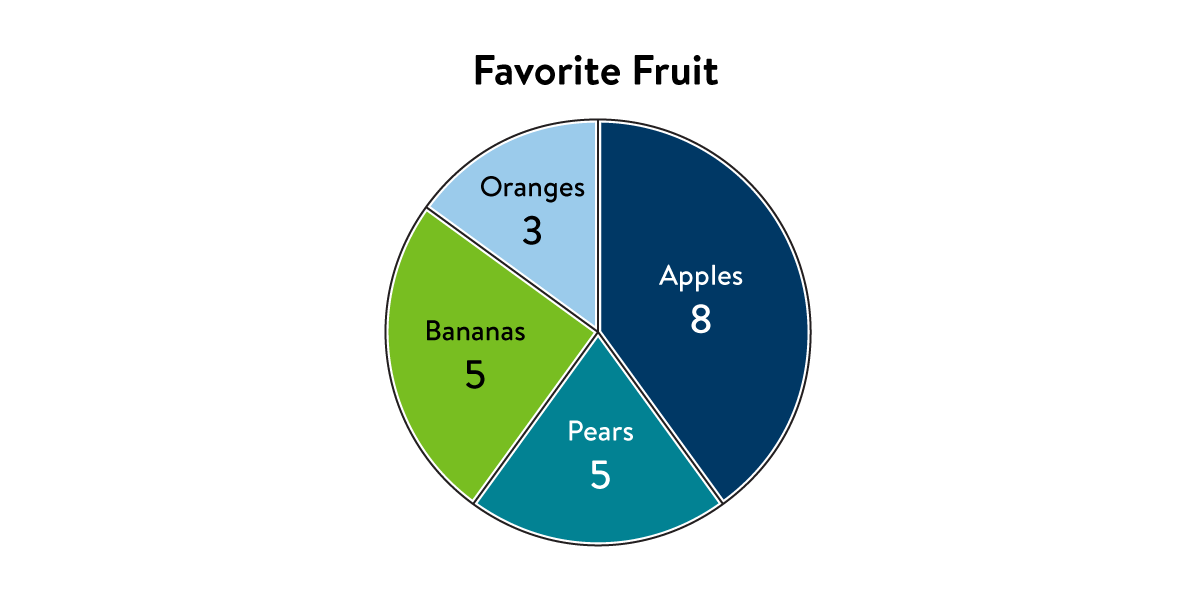
While the previous example contains graph segments with white outlines, graph example 5 features both white and black outlines, which further increase the contrast and usability of the graph.
How to test
How to check color contrast
You can use a contrast checking tool, such as Colour Contrast Analyser, to ensure that a contrast ratio of 3:1 is provided for icons and other important graphical objects. These tools allow the user to select the text and background color using an eyedropper tool and offer a pass/fail score for the color combinations, as well as a number indicating the contrast ratio (such as 3:1, 2.5:1, etc.)
Graphics that convey information must also meet this non-text minimum contrast ratio. This includes icons that convey information, lines in line graphs, and slices in pie charts. For example, users who can’t distinguish lines in a line graph or between slices in a pie chart can’t interpret the information.
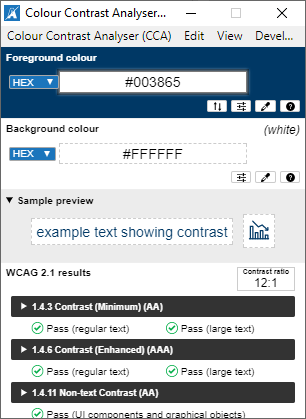
Colour Contrast Analyser application screenshot showing how the foreground color of #003865 (“Minnesota blue”) achieves a contrast ratio of 12:1, a strong passing score for both regular and large text under WCAG 2.1 level AA. It also passes AAA, which is a higher level of conformance than the State of Minnesota adheres to.
Testing for people with color blindness
You can test how your color choices might be perceived by a user with color blindness using an online color blindness vision simulator, such as the simulator offered by color-blindness.com or one that is offered in Adobe Creative Cloud applications. In Adobe Illustrator or Photoshop, you can turn on the color blindness simulator by visiting View > Proof Setup in the menu and then selecting the type of color blindness you wish to simulate.
Graph viewed through a color blindness simulator
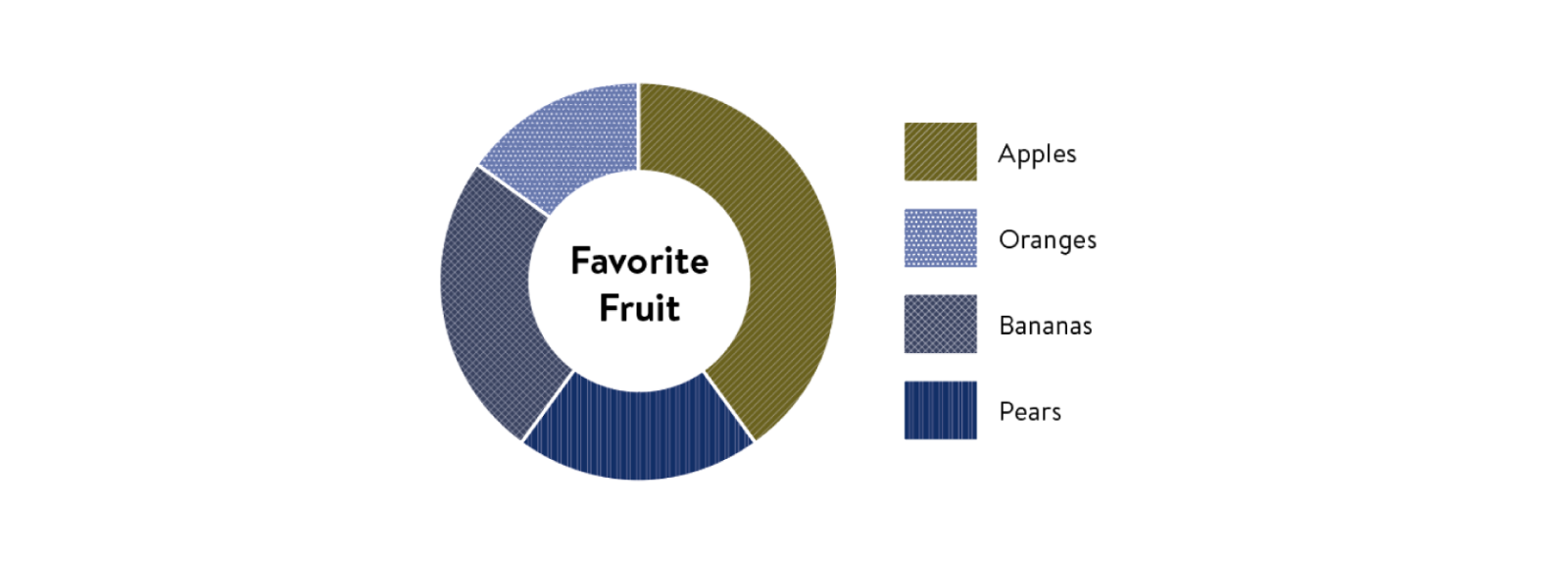
Here is a simulation of the “favorite fruit” graph showing how it might appear to someone with deuteranopia-type color blindness. It was generated using the color blindness simulator in Adobe Illustrator.
Graph converted to grayscale

Another simple method for simulating color blindness is to convert the graph to grayscale. You can see how important the pattern fills are for this graph type. You can see how your image looks in grayscale by using an online colorblindness simulator, such as color-blindness.com. If you have access to Adobe Creative Cloud applications, you can view the image in grayscale by changing the color mode to grayscale.
Testing tools
Training resources
References