The Future of our Connected Devices Depends on Keeping Them Secure
10/20/2020 3:13:08 PM

By Mike Virnig, Information Security Analyst, MNIT partnering with the Department of Education
Does your doorbell camera have a password? Do your smart appliances constantly listen for commands? Are your smart light bulbs and thermostat due for an update?
The smart devices that connect our homes can enrich our daily lives; however, most smart devices do not have built in privacy and security controls. Unlike computers that have firewalls and antivirus software, it is more difficult to secure a smart device.
Smart devices can also leave us vulnerable to cyber attacks when we set up our home network or configure the devices. The future of our connected devices depends on all of us understanding how to keep them secure.
Think about a secure smart home as a castle. The internet is the main passage to and from the castle gate. The smart devices, computers, and home network are all contained within your protective castle walls. Start by identifying all the ways that smart devices connect to your networks and develop a plan on how to secure them.
The first step to a secure castle, or a connected home, is to have a secure gate that only lets approved information in and out. In a smart home, that gate is your modem/router and all traffic from your connected devices must go through it. This is referred to as your home gateway and it is your first line of defense. There are many ways to update and configure modems and routers. If your gateway is provided by your internet service provider (ISP), they are responsible for keeping it updated and should provide the ability to update/reboot it manually from your customer account. If you purchased your own gateway, then you are responsible for maintaining and updating it. Depending on your home network, you may have a separate modem and router, or a modem and router combination device.
Your owner’s manual is the most important resource for setup and maintenance of your devices. If you no longer have the manual, look up the brand and model on the company’s website and you should be able to get a digital copy. You can also access your gateway by using its IP address. On a Windows computer, locate the Command prompt by using the computer’s search feature or selecting the Windows key and the R key and typing in cmd. At the Command prompt, type in ipconfig. Your device IP address will be listed as the Default Gateway.
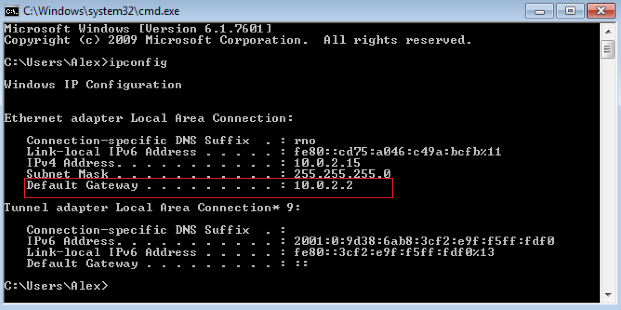
Enter the Default Gateway IP address into a web browser to access your device. Log in to the device with the password located on the device or search for the brand’s default credentials.
If default passwords are being used, it is extremely important to change them. Lastly, install any necessary software and firmware updates to all modems/routers.
Now that the gateway is secure, let’s focus on some things that can enhance the security of doorbell cameras, smart thermostats, security systems, and home devices like Alexa and Google Home. These devices likely have a default password in place.
Check the user manuals or search online for information about how to access your devices and how to update them. Many smart devices have limited functionality, like a smart bulb. Make sure to change the password and ensure the device is updated, if possible, as cyber criminals use default passwords to access your personal information. Read these articles from the New York Times and Newsweek to get insight into how hackers accessed home security cameras and smart thermostats.
If you’ve ever been hacked, your password may be in a database somewhere. Reusing passwords is as dangerous as leaving default passwords in place, as hackers use old passwords thousands of times per second. To check for email account compromises against a database of known breaches, go to haveibeenpwned.com. To create and store strong passwords, use a password manager.
Once you have secured the gate and castle, remain vigilant. Consistently check for updates and apply them to computers, tablets, phones, smart devices and anything else that connects to your WiFi or network. Also change your passwords regularly as the longer a password is unchanged, the more vulnerable it becomes.

