Making Remote Meetings Work for You
7/31/2019 10:26:06 AM

By: Jay Wyant, Chief Information Accessibility Officer
Meetings are a great way to increase productivity by bringing people together to accomplish a shared goal.
At least that’s the idea. What happens when:
Thanks to the rapid growth in smartphones, webinar and conferencing software, and ubiquitous WiFi, people are starting to frame meetings by the technology (“let’s Skype”) as often as the physical location. Lack of physical presence is no longer seen as a barrier to a successful meeting.
This is great for folks who aren’t as mobile, while often creating challenges for others who may not hear as well, or have difficulty accessing software controls.So how do we take advantage of new technologies without letting them become a barrier for some participants?
There’s no magic wand that can address all potential problems (although the American Bar Association toolkit and checklist are very comprehensive), and this is a newsletter article, not a book. So here are just three basic concepts that you can use to help ensure your meetings are successful:
Ever started up a familiar tool to find that the vendor had “upgraded” it since the last time you used it, and the controls weren’t where you thought they were?
Perhaps you planned to hold the meeting with a tool that used the computer’s audio, then at the last minute a colleague said “I’m driving, so mind if I call in? So, you had to switch to a different tool that had a phone number. Then while you’re running the meeting, someone asks a question via chat that you don’t see until after the meeting finishes.
Technologies evolve. Meeting requirements change. People communicate in multiple ways.
Not all rooms are created equal. What options does the room provide? How do you connect to the projector? Does it interfere with your ability to share information with remote attendees? How strong is the network signal? Can you switch rooms if needed?
Some considerations to keep in mind when designating a room for your meeting:
Here are two stories that illustrate these considerations.
Where we work, in the Centennial Building (built in 1958), the Blazing Star meeting room on the ground floor was recently remodeled. It is a popular location for meetings involving folks from other agencies, vendors, and members of the public. Because of this, Minnesota IT Services made the decision to add an induction loop to the remodel plans.
Induction loops are relatively simple concepts. The vendor laid a network of copper wire on the concrete floor, which were then connected to the room’s sound system.
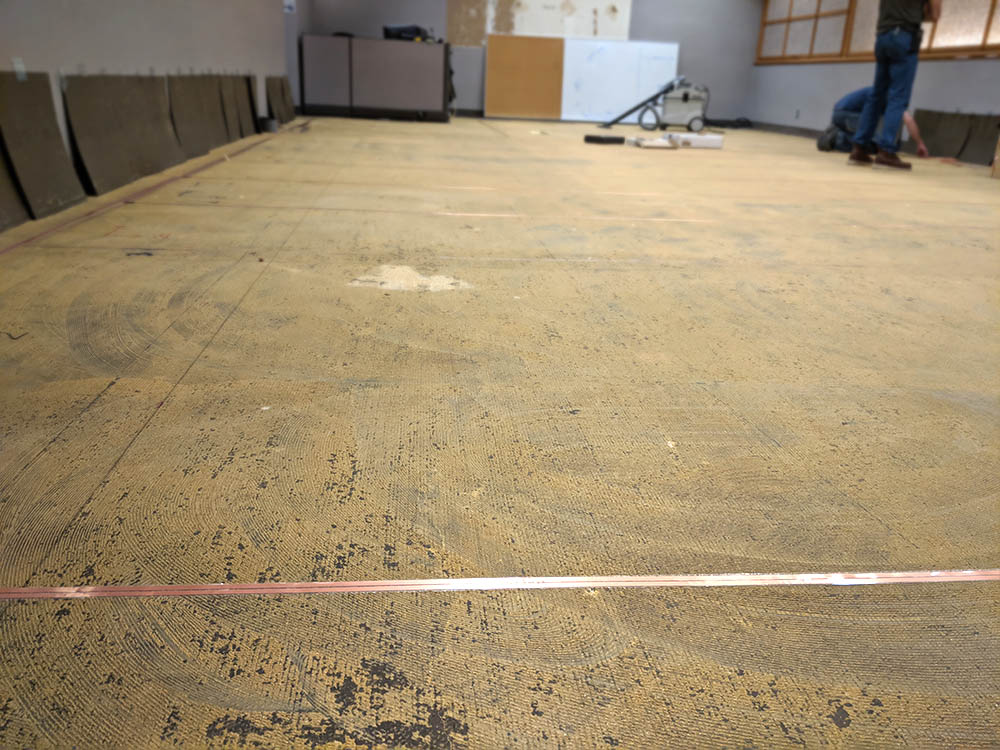
This means that folks who wear assistive listening devices such as hearing aids and cochlear implants have clearer, cleaner access to sound from the microphone.
The room is equipped with several headsets that access the induction loop. When we tested the new setup, a person with “normal” hearing expressed preference for wearing the headset – because the sound was as clear as if the speaker was sitting next to her, rather than across the room.
We also learned that the setup is different when you have remote attendees, as the ceiling microphones are coordinating with the ceiling speakers as well as the other microphones.
However, our testing revealed that room’s ceiling mics don’t seem to properly function with the web. We’re excited about the new induction loop. We expect it will make meetings easier and more productive for some participants. A key factor to remember – it requires using the microphone system!
I recently attended a strategic planning meeting in a hotel conference room with international participants, some of whom were calling in from their respective countries. Unfortunately, there were problems with the room’s network and sound systems, and the remote participants had difficulty hearing the speakers in the room even though everyone scrupulously used the microphone.
There was a CART writer (captioner) in the room, so remote participants could read the captions and they could comment via chat. However, they expressed frustration that they couldn’t engage in the discussion as effectively as they would have liked.
What if a remote participant has a hearing loss? Or has poor cell phone coverage? Or what if the participants are from around the world, with varying accents and command of the language used in the meeting?
When organizing a meeting, provide attendees with the opportunity to request accommodations in advance. That might range from a request for CART (Communication Access Realtime Translation) to an advance electronic copy of all materials. Be sure to allow enough time to support such requests. For example, It can take at least two or three days’ advance notice to secure a CART writer, and at least as many days to Braille a report or make an accessible PDF of a PowerPoint deck.
Some considerations:
If you’ve never thought about some of these issues before, holding a meeting with remote and local participants can suddenly seem like a daunting task. The key is to demonstrate to participants that you’re aware of what they need to be successful (because they’ve had the chance to tell you), and to take the time to prepare for the meeting.
And if things aren’t working? Don’t be afraid to postpone the meeting to another time.
The Office of Accessibility site has a variety of resources, such as a section on Meetings as well as others on social media and multimedia.
Would you like to learn more about the accessibility work being done by Minnesota IT Services and the State of Minnesota? Once a month we will bring you more tips, articles, and ways to learn more about digital accessibility.

