Taking inventory, migrating content, and getting to know our audience.
12/1/2017 2:43:46 PM

Since we already had an existing intranet, we needed to identify what we had, where it was, if it should be moved to the new intranet, and where it should go. The team met with staff from Human Resources, Finance, and Legal divisions to make sure we wouldn’t leave anything behind.
Best practice: If you have an existing intranet site, a good inventory can help map out what needs to be done for the developers. It can be as simple as creating a spreadsheet and copying the URL of the source content you need to move. When you have the new structure built, then you can add the target URL you want to move the content to.
Our move to a new intranet was a bit tricky because it involved 1) moving content from one platform (SharePoint) to an entirely different platform (Tridion) and 2) separating the old MNIT Commons site collection and pulling apart the intranet site from the collaboration sites that had been tied together. Our senior graphic designer developed a great illustration that helped tell the story:
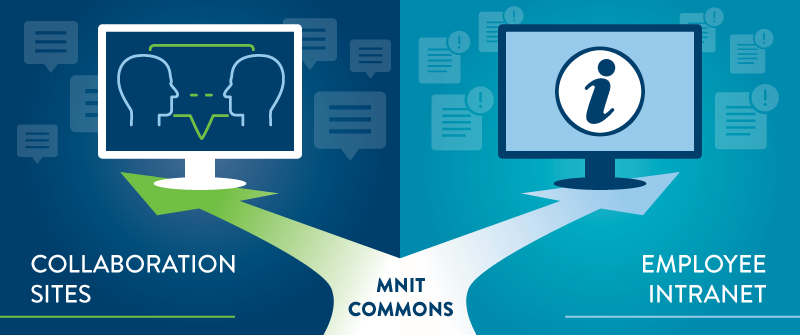
The separation of the old MNIT Commons involved an enormous amount of planning, collaboration and heavy lifting for the project team, the content owners, the web development team, and the SharePoint support team. The site inventory came in handy to help identify what content should move, where it moved to, and what content would be deleted.
When we began to build this new intranet, our primary goal was to help a diverse group of employees do their jobs more easily. Questions quickly arose at team meetings:
Although it was vital to involve real employees in our project, it wasn’t feasible to involve users in every single decision. So we used a technique widely used in best practices. We created intranet user personas--a virtual panel of key employees—to provide direction and clarity around key issues.
What is a persona? A user persona is an imaginary person you create to represent a large group of users who share many characteristics in common. It is an archetypal user to whom many real users are quite similar.
For our project, we created four personas with names that represented large groups of our employees: Newbie Nick, Manager Mike, Near-Retirement Nancy, and Developer Deborah. For every decision we made, we asked ourselves how it would affect those personas: “Where would Newbie Nick look for benefits? How would Manager Mike find training information for his staff? Does Nancy need information about the post-retirement option? Where would Deborah look for a job posting that she was interested in bidding on?”
Best Practice: When you create user personas you flesh out details about the imaginary people to make them highly realistic and relatable. And you conduct research to understand the different patterns that tie users together into clearly delineated groups.
What’s the value? User personas help an intranet team escape conceptual debates around personal preferences as well as political jousting between stakeholders. Referencing user personas at key decision moments forces personal preferences to recede and shifts the focus to users’ needs. This smooths the decision-making process and results in a simpler, more purposeful intranet.
Check back later this week for part 3 in the MNIT Intranet Story to learn about our process with information architecture, design, development and content.
Digital Government

