

Using MnGeo's Imagery WMS in ArcGIS Online
ArcGIS Online (AGOL) is a popular subscription-based web mapping platform. MnGeo’s WMS Imagery can be added to an AGOL map using these instructions.
- Go to ArcGIS Online
- Click “Map” on the top navigation bar
- Click the dropdown arrow next to “Add” in the layers pane to the left
- Click “Add layer from URL”
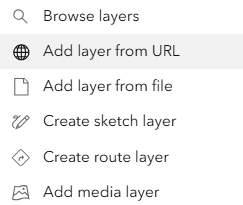
- In the URL input box, enter one of the following (note that the question mark is part of the URL):
- For our Geospatial Image Service with a large list of layers: https://imageserver.gisdata.mn.gov/cgi-bin/wmswm?
- For our “composite” service, which automatically switches layers for you based on extent and scale: https://imageserver.gisdata.mn.gov/cgi-bin/mncomp?
- Under “Type”, click the “Select layer type” dropdown and select “WMS (OGC)”
- Turn on “Use as a basemap”
- Click “Next”
- Use the checkboxes to select which layers you'd like to add
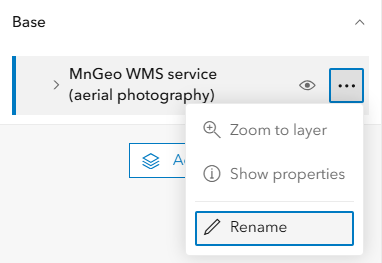
- Select the “Use as basemap” button in the lower right. You should now see the added WMS within the map. Access these layers by selecting the "Basemap" option on the left navigation bar. To avoid confusion, you can now rename the layer as desired using the ellipsis next to the WMS layer name
- Save your map if desired. Warning: choosing one of Esri’s basemaps will change your coordinate system and lose the imagery until you make the image service your basemap
Reference Layer
If you want to have a reference layer to help you navigate around the map, there are several options. While most are not ideal for a “production map”, they are at least useful in helping orient yourself. Here are three examples:
- Click the dropdown arrow next to “Add” in the layers pane to the left and select “Add layer from URL”
- Under “Type", choose “ArcGIS Server web service”
- For the URL, paste in the following:
- For “World Reference”, which generally works well at small scales (larger areas): https://services.arcgisonline.com/arcgis/rest/services/Reference/World_Reference_Overlay/MapServer/
- For “World Transportation”, which is better suited for large scales (smaller areas): https://server.arcgisonline.com/ArcGIS/rest/services/Reference/World_Transportation/MapServer
- For the Minnesota Department of Agriculture's basemap layer: https://gis.mda.state.mn.us/arcgis/rest/services/MDA_Basemap/MDA_BasemapC/MapServer
- Click “Add to map”