-
Renewal
All CPAs with a status of Active or Inactive, as well as all CPA and Sole Proprietor firms, must renew by December 31 every year, regardless of when the license is issued. The renewal window opens October 1, 2026.
NOTE: There is no grace period for unlicensed practice or holding out. All licenses and permits expire on December 31 each year.
These statuses should renew using ONLINE SERVICES:
- Active remaining Active*
- Active changing to Inactive*
- Inactive remaining Inactive
- Sole Proprietor firms who do not perform work that requires peer review** may renew the firm permit through Online Services after first renewing an individual license.
* If you need to carry back CPE hours to a previous reporting period, or are Inactive changing to Active, you must renew using the printable PDF 2027 Individual CPA Certificate Renewal form (available STARTING October 1)
** If your firm performed any peer-reviewable services, you must renew using the printable PDF 2027 CPA Sole Proprietor Firm Permit Renewal form (available STARTING October 1)
- LOGIN using your 5-digit certificate number and the last four digits of your SSN. (For those with a 4-digit certificate number, add either a zero or "C" to the start of the number.)
- UPDATE your CPE (if currently an Active licensee), VERIFY your contact information. ANSWER the questions, and then PROCEED to checkout.
- PAY for your renewal by entering your credit card details, clicking on CONTINUE to review the information, then clicking SUBMIT to pay. Make sure you receive confirmation of your payment.
CPE Required for Active Status Licensure
- CPE must have been earned by June 30, 2026 or you will incur late fees.
- View CPE Requirements and more on the Continuing Education website.
- EXCEPTION: Those initially licensed July 1, 2025 or later have no CPE requirement for this renewal.
Renew your 2026 Individual CPA Certificate by mail ONLY IF:
- You are carrying back CPE and you want to submit that paperwork with your renewal;
- You had disciplinary action taken against you since your last renewal
- You want to change your Inactive status license to an Active status license
Access the printable PDF 2027 INDIVIDUAL CPA CERTIFICATE RENEWAL FORM (available STARTING October 1)
Looking to go Exempt or Retire?
Complete the appropriate Exempt Status Election Form or Retired Status Request Form and submit.
What Else Can a Licensee Do Through Online Services?
- Update contact information including mailing address and phone number.
- Review CPE reported the previous year. This can be useful when determining how to meet the rolling 3-year requirements.
- Enter earned CPE for the current year. This is a one-time entry; licensees must wait until all CPE is earned and ready to be reported.
For those who missed the renewal deadline , please see the "What is the process of renewing after the December 31 deadline?" FAQ
-
Name/Address Changes
Name/Address Changes for Individuals
(For Firm name and address changes, see the Firms Status Changes tab.)
Name Changes for Individuals
Legal name changes must be made in writing by sending an email to the Board office within 30 days of the change. You must attach a copy of your legal name change documentation, such as:
- a marriage certificate that documents your previous name AND your new name;
- the pertinent section of a divorce decree that documents the name change; or
- a court-issued Order Granting Name Change.
You are required to provide the Board with your full legal name - no nicknames. Please allow up to 72 hours for the name change to be processed.
Address Changes for Individuals
Use one of these two options within 30 days of any change of mailing address:
To update your email address, notify the Board in writing by sending an email.
NOTE: During renewals, please first send a copy of the legal name change documentation to the Board to have the license record updated. Once it has been updated, the online renewal can proceed. Alternately, licensees can use the printable PDF form to renew (available in the Document Library) and enclose the name change document with the renewal.
-
Employer & Status Changes
Employer Changes
EMPLOYER CHANGES: Please notify the Board in writing by sending an email within 30 days of a change of your employment status, employer, and employer's physical address and phone number.
To Request a Status Change
See the CPE page for details on CPE reporting required for making a status change.
From Active to Inactive
- This request must be made at the time of renewal in the fall.
- All CPE reporting requirements for Active status must be current.
- Use Online Services to record earned CPE and complete a renewal selecting status change to Inactive.
- If the online system cannot be used or if supporting documentation needs to be submitted to the Board office, please complete the appropriate printable PDF paper renewal form available through the Document Library.
From Inactive to Active
For a status change to take place immediately:
- Submit to the Board a completed printable PDF Status Change to Active Request Form.
- Submit 120 hours of qualifying CPE earned no more than three calendar years prior to the date the Board received the Status Change application.
- An Inactive license cannot be expired for more than one year. If it is, the Inactive license must be brought current before requesting change to Active.
For a status change to become effective on January 1 of the coming year:
- Make this request at the time of renewal in the fall, using the appropriate printable PDF paper renewal form available through the Document Library. Follow the instructions on the form for "Inactive Changing to Active."
- Submit 120 hours of qualifying CPE as instructed on the reporting form as required in Minnesota Rules 1105.3000(D).
- An Inactive license cannot be expired for more than one year. If it is, the Inactive license must be brought current before requesting change to Active.
From Exempt or Retired to Active
- Submit 120 hours of qualifying CPE earned no more than three calendar years prior to the date the Board received the Status Change application.
- Submit to the Board a completed printable PDF Status Change to Active Request Form.
From Active or Inactive to Exempt
- While there is no status change fee to move to Exempt, if the Active or Inactive license has already expired, late filing fees will apply.
- For an Active license after the June 30 CPE earning deadline, the licensee must be compliant with the 1- and 3-year reporting requirements incurred while holding that Active license.
- Submit to the Board a completed printable PDF Exempt Election Form available through the Document Library.
To Surrender a Certificate or the Certificate of a Deceased CPA
- Please make this request via email to the Board. Be sure to include the name, mailing address, and certificate number being surrendered. For notifications on behalf of a deceased CPA's estate, the Board respectfully requests the inclusion of the obituary or notice.
-
Retirement
To Request a Status Change to Retired
From Active, Inactive, or Exempt to Retired, the following requirements must be met:
- the licensee is 55 years of age or older;
- the licensee must hold either an Active or Inactive license in good standing (which means the license cannot be expired more than a year), or hold Exempt status;
- the licensee must be retired from the practice of public accounting in all jurisdictions; and
- if the licensee is a firm owner, the Board must receive notice in writing (either by sending an email or a letter) of a change in firm ownership showing the licensee is no longer an owner, or in the case of a single-owner firm or Sole Proprietor firm, a notice of dissolution of the firm.
- Submit to the Board a completed printable PDF Retired Request Form available through the Document Library.
-
License Cards
Printing License Cards
Current CPA licensees and Sole Proprietor firms may print a copy of their license card through Online Services. The Board does not mail license or permit cards upon renewal. Current Active and Inactive status licensees may instead log into Online Services and print a PDF version of their license card. Sole Proprietors whose firm permit number is the same as their individual license number can also print a copy of their firm permit.
Log in to Online Services, then select the "License Card" tab (see image).
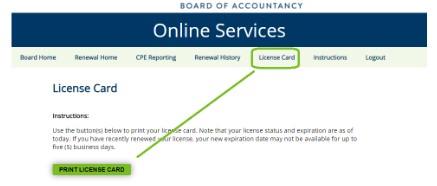
If a card is available, the "Print License Card" option will show. Note that if a license has just been recently issued or renewed, the card may not be available (or may not show the new expiration date) for 3-5 business days.
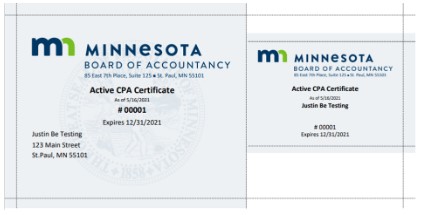
Select "Print License Card" to generate a PDF copy of the license card. You may save the file, print the license card, or both. Lines on the 8-1/2 x 11” printout indicate where to cut to create the traditional oversized and wallet-sized cards.
Please note: No license or permit cards are available for CPA firms or RAPs and RAP firms. To verify those license statuses and expiration dates, use the Find a CPA and Find a CPA Firm service on the Board’s website.
-
Reinstatement
Reinstatement
The Board may reinstate a suspended, revoked, or surrendered certificate. Depending upon the circumstances, the Board may require that the person submits evidence of obtaining a certain number of continuing professional education (CPE) credits or place other conditions on reinstatement. See Minnesota Statutes 326A.09 for more information.
To request reinstatement, use the Application for Reinstatement of a Revoked License.
NOTE: If the license has simply expired and was never formally revoked, please submit a printable PDF Individual CPA Certificate Late Renewal Form available through the Document Library – NOT the Reinstatement form.
-
Transfers
Requesting License Information and Exam Scores Be Sent to Another State
If you are obtaining licensure in another state and need your Minnesota exam scores or license verified, please do the following:
- Contact the other state to obtain the specific form they may require you to use.
- Contact the Minnesota Board office with your request in writing. Partially complete and sign the other state's form. Include a cover note that contains the Minnesota licensee’s name and Minnesota license number (if applicable). Be sure to include the address to which the form needs to be sent.
If the state does not have a required form, please contact the Board office in writing (either via email to the Board or letter) explaining the information that needs to be sent and that no state-specific form is available. Again, include a cover note that contains the Minnesota licensee’s name and Minnesota license number (if applicable). Be sure to include the address to which the form needs to be sent.
Requesting a "Letter of Good Standing"
If a potential employer, professional society, or other entity requires a "letter of good standing" regarding your licensure, please contact the Board in writing (either via email to the Board or letter). Be sure your request includes the address to which the letter needs to be sent. Please note: since some of the information requested may be classified as private or confidential, the Board does not accept requests by phone.